Template Profiling Tool
Overview
The Template Profiling Tool is a powerful pytest-based framework for automated testing and profiling of MLIR operations across different hardware targets. It enables developers to validate operator implementations with various input shapes, data types, and compiler configurations while collecting detailed performance metrics.
Prerequisites
Important
Before using the Template Profiling Tool, you must complete the build and setup instructions in the Getting Started Guide, specifically the Build and Setup section. This ensures:
The TORQ compiler environment is properly configured
All required dependencies are installed
Python virtual environment is activated
The build is completed successfully
Hardware Setup for Remote Testing
For testing on Astra Machina hardware:
Ensure the Astra Machina board is connected to your local network
Obtain the IP address of the board (e.g.,
10.3.120.54)Verify SSH access to the board:
ssh root@<board-ip-address>Ensure you can authenticate (via SSH keys or password)
Quick Start
Run template profiling tests on remote SoC hardware with a single command:
(venv) ~/torq-compiler-dev$ pytest tests/test_template_mlir.py -k add_bf16.mlir -v \
  --torq-addr=root@10.3.120.54 \
  --torq-runtime-hw-type=astra_machina \
  --torq-runtime-profiling-output-dir=./result/ \
  --template-profiling-enabled \
  --recompute-cache
This command will:
Run sample template mlir matching name “add_bf16.mlir” in torq-compiler-dev/tests/testdata/template_ops
Execute on the remote Astra Machina at
10.3.120.54Enable profiling and save results to
./result/directoryRecompute all cached results
Tool Output
Example output showing the template profiling tool running tests across multiple shapes, and compiler configurations with detailed profiling metrics.
Architecture
┌─────────────────────────────────────────────────────────────────┐
│                    Template Profiling Tool                      │
└─────────────────────────────────────────────────────────────────┘
                              │
                              ▼
        ┌─────────────────────────────────────────┐
        │   MLIR Template Files (.mlir)           │
        │   - Placeholders: {shape_1_i8}          │
        │   - Placeholders: {shape_2_bf16}        │
        │   - Placeholders: {shape_3_i32}         │
        └─────────────────────────────────────────┘
                              │
                              ▼
        ┌─────────────────────────────────────────┐
        │   Dynamic Shape Generation              │
        │   - Rank: 1D, 2D, 3D, 4D                │
        │   - Dtypes: i8, i16, i32, bf16, f32...  │
        │   - LRAM size constraints               │
        └─────────────────────────────────────────┘
                              │
                              ▼
        ┌─────────────────────────────────────────┐
        │   Compiler Variants                     │
        │   - NSS (no CSS, no Host)               │
        │   - Host (no NSS, no CSS)               │
        │   - CSS (no NSS, no Host)               │
        └─────────────────────────────────────────┘
                              │
                              ▼
        ┌─────────────────────────────────────────┐
        │   Torq Execution                        │
        │   - Remote SoC via SSH                  │
        └─────────────────────────────────────────┘
                              │
                              ▼
        ┌─────────────────────────────────────────┐
        │   Performance Profiling                 │
        │   - Execution time                      │
        │   - Hardware utilization                │
        │   - Performance visualization           │
        └─────────────────────────────────────────┘
How It Works
Template MLIR Files
Template files contain placeholders for dynamic shape substitution:
module {
  func.func @main(%arg0: !torch.vtensor<{shape_4_bf16},bf16>, %arg1: !torch.vtensor<{shape_4_bf16},bf16>) -> !torch.vtensor<{shape_4_bf16},bf16> attributes {torch.onnx_meta.ir_version = 10 : si64, torch.onnx_meta.opset_version = 22 : si64, torch.onnx_meta.producer_name = "", torch.onnx_meta.producer_version = ""} {
    %0 = torch.operator "onnx.Add"(%arg0, %arg1) : (!torch.vtensor<{shape_4_bf16},bf16>, !torch.vtensor<{shape_4_bf16},bf16>) -> !torch.vtensor<{shape_4_bf16},bf16>
    return %0 : !torch.vtensor<{shape_4_bf16},bf16>
  }
}
Placeholder Syntax:
{shape_1_i8}- 1D shape with int8 dtype{shape_2_bf16}- 2D shape with bfloat16 dtype{shape_3_i32}- 3D shape with int32 dtype{shape_4_f32}- 4D shape with float32 dtype
Warning
Current Limitation: Each template file can only use one type of placeholder throughout. You cannot mix different rank or dtype placeholders in the same template. For example, you cannot combine {shape_3_bf16} and {shape_4_i32} in a single template file. All placeholders in a template must have the same rank and dtype combination for now.
Shape Generation Algorithm
┌──────────────────────────────────────────────────────────────┐
│  Shape Generation Flow                                       │
└──────────────────────────────────────────────────────────────┘
                              │
                              ▼
        ┌─────────────────────────────────────────┐
        │  Calculate Max Elements                 │
        │  max_elements = (LRAM_KB * 1024)        │
        │                / (dtype_size * 3)       │
        └─────────────────────────────────────────┘
                              │
                              ▼
        ┌─────────────────────────────────────────┐
        │  Generate Size Factors                  │
        │  - Quadratic distribution               │
        │  - More samples at small sizes          │
        │  - 1% to 100% range                     │
        └─────────────────────────────────────────┘
                              │
                              ▼
        ┌─────────────────────────────────────────┐
        │  Rank-Specific Shape Generation         │
        │  - 1D: [size]                           │
        │  - 2D: [1, features]                    │
        │  - 3D: [1, seq, features]               │
        │  - 4D: [1, ch, height, width]           │
        └─────────────────────────────────────────┘
Key Parameters:
lram_size: Maximum tensor size in KB (default: 500 KB)num_samples: Number of shape variations per (rank, dtype) (default: 1)Size constraint:
product(shape) × dtype_size × 3 < lram_size
Note
To modify lram_size or num_samples, edit the module-level constants in torq-compiler-dev/tests/test_template_mlir.py:
# Shape generation defaults
DEFAULT_LRAM_SIZE = 500  # KB
DEFAULT_NUM_SAMPLES = 1
These constants are used throughout the test file in both the case_config fixture and pytest_generate_tests hook.
Compiler Variants
Three compiler configuration variants are automatically tested:
Variant |
Description |
Compiler Flags |
|---|---|---|
NSS |
NSS-only execution |
|
Host |
Host-only execution |
|
CSS |
CSS-only execution |
|
Features and Capabilities
What It Can Do
1. Multi-Rank Testing
Test operators with 1D, 2D, 3D, and 4D tensors automatically:
1D: Vector operations
[size]2D: Matrix operations
[batch=1, features]3D: Sequence operations
[batch=1, seq, features]4D: Image/Conv operations
[batch=1, channels, height, width]
2. Multi-Dtype Support
Comprehensive data type coverage:
Integers: i8, i16, i32, i64
Unsigned: ui8, ui16, ui32, ui64
Floating Point: f16, f32, f64, bf16
3. Dynamic Shape Generation
Automatic generation of valid shapes based on LRAM constraints
Quadratic distribution for more small-size testing
64-byte alignment for last dimension
Configurable by editing
case_configintest_template_mlir.py
4. Performance Profiling
Enable detailed profiling with --template-profiling-enabled:
Execution time per operator
Hardware utilization metrics
Memory bandwidth analysis
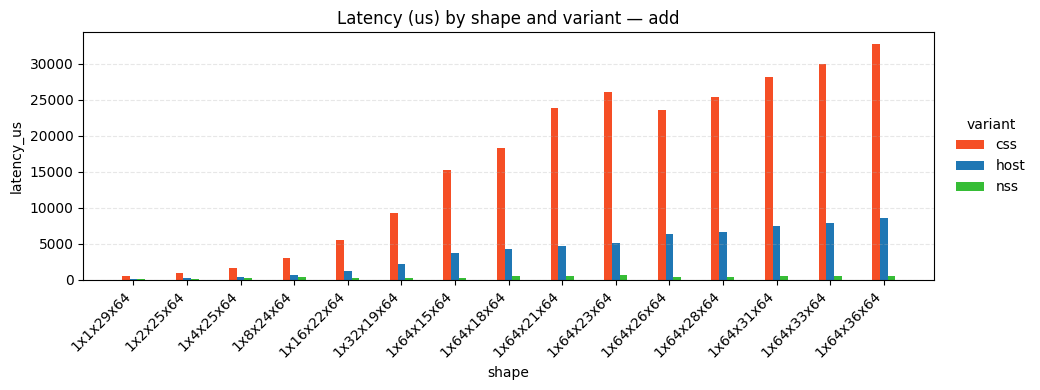
Profiling data exported to CSV/PNG
5. Selective Test Execution
Use pytest’s -k flag for focused testing:
# Test only addition operators
pytest tests/test_template_mlir.py -k add.mlir ...
6. Custom Compiler Options
Add extra compiler flags:
pytest tests/test_template_mlir.py \
  --extra-torq-compiler-options="..." ...
Understanding Test Output
Profiling Output
Profiling data is saved in the specified output directory:
./profiling_results/
├── test_run_templates_on_soc[r4_bf16_1x1x29x64-css-add_bf16.mlir-astra_machina-default].csv
├── test_run_templates_on_soc[r4_bf16_1x1x29x64-nss-add_bf16.mlir-astra_machina-default].csv
├── test_run_templates_on_soc[r4_bf16_1x1x29x64-host-add_bf16.mlir-astra_machina-default].csv
|
...
|
└── latency_by_shape_variant_bar.png
Limitations and Current Constraints
What It Currently Cannot Do
1. Arbitrary Shape Relationships
Templates cannot express relationships like “output shape = input1 + input2”
Each placeholder is independently generated
Workaround: Create multiple template files with explicit shapes
3. Complex Dtype Interactions
Limited support for mixed-precision operations
All operands of a placeholder must use the same dtype
Example: Cannot easily test
i8 × i8 → i32accumulation patterns
4. Memory Constraint Validation
LRAM size checks are heuristic-based (factor of 3)
Does not account for intermediate buffer allocations
Risk: May generate shapes that OOM at runtime
5. Multi-Input Shape Broadcasting
No automatic generation of broadcast-compatible shapes
All inputs must have identical shapes
Workaround: Manually create templates with specific broadcast patterns